

Anthropic launched mods in Claude Code 2.1.287. Learn what mods are, how they work, popular examples, and the security risks every developer should know.
Claude Code Mods Explained: Anthropic’s New Way to Customize Your AI Coding Agent
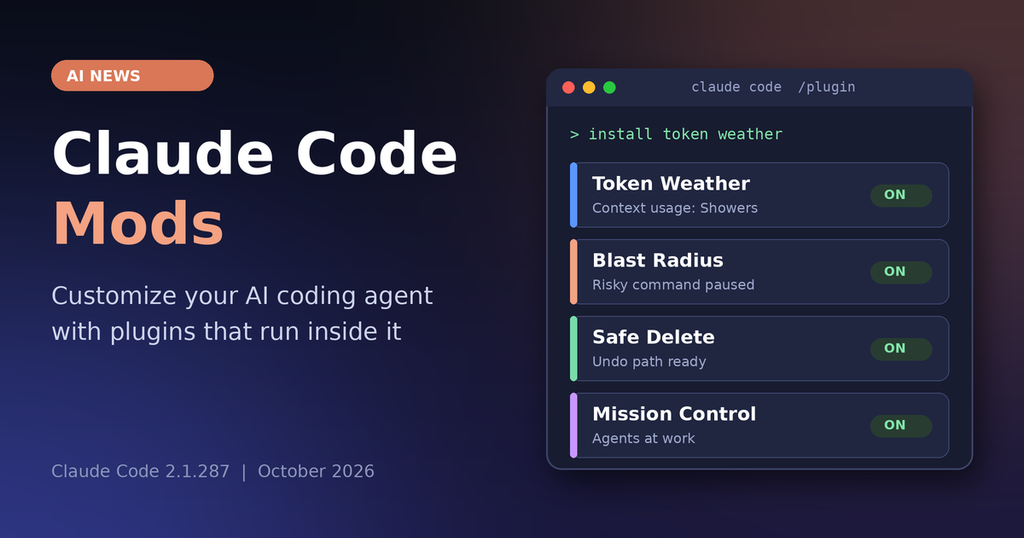
On October 1, 2026, Anthropic released Claude Code version 2.1.287 and introduced a major new feature called mods. These are small TypeScript or JavaScript plugins that let developers change how the coding agent behaves, how its interface looks, and which built in features it uses. For anyone following the latest AI news, this release turns Claude Code from a fairly fixed tool into something much closer to a personal development cockpit.
What Are Claude Code Mods?
A mod is a plugin whose core logic lives in a JavaScript or TypeScript module. That module registers event handlers, and Claude Code calls them when something specific happens, such as:
- Submitting a prompt
- Making a tool call
- Requesting a permission
- Drawing part of the interface
- Finishing a turn
Each handler can observe the event, rewrite it, or take it over completely so the default behavior never runs. That is the key difference from earlier options like settings hooks, skills, status lines, or MCP servers. Those mostly run outside the main process or only supply extra text and tools. Mods run inside Claude Code itself.
What Can Claude Code Mods Do?
According to the launch coverage, a mod can:
- Rewrite a prompt before it reaches the model
- Block, rewrite, or retry a tool call
- Approve or deny a permission request automatically
- Redact secrets from tool output before Claude sees them
- Draw custom interface elements such as side panes, bands above the prompt, buttons, tabs, and text fields
- Replace or restyle built in components such as tool call rows, spinners, and dialogs
Some of Claude Code’s own features, including the /diff pane, are now implemented as mods. Users can disable them or swap in their own versions through the normal plugin system.
How to Install and Build Mods in Claude Code
Mods are distributed and installed like any other Claude Code plugin. You use the /plugin command in the command line or desktop app, or you install from marketplaces and GitHub repositories. Once installed, a mod stays loaded for the session and can keep state across events, which makes live, updating displays possible.
Anthropic made getting started easy. You can describe the behavior you want, ask Claude Code to write the TypeScript, install the mod, and hot reload it into your current session. Official samples and a getting started tutorial are available in Anthropic’s documentation.
To use mods you need Claude Code 2.1.287 or later, and mods are enabled by default. Update with your package manager or by running claude update. For more updates on Claude Code and AI coding tools, keep an eye on our AI news section.
Official and Community Mods Worth Trying
Anthropic’s own sample mods show how wide the range is:
- Token Weather shows context window usage as a forecast that moves from Clear to Showers to Storm, with a sparkline of recent usage.
- Blast Radius pauses risky shell commands such as recursive force deletes and shows a side pane listing the files that would be affected, so you can confirm or cancel.
- You Should Know is a side agent that watches the main session and flags information you may have missed.
- Replay Theater records file edits so you can step through them later.
The community also moved fast. One popular free collection is a pack of twelve mods shared by Charlie Hills. It includes:
- Mission Control, a real time tracker of what Claude and its agents are doing
- Pixel art office desks that give each session a light visual identity
- Safe Delete, which intercepts destructive file operations, moves files to a recoverable location, and offers an undo path
- Checklist trackers, context meters, and notification helpers
Early catalogs reportedly list hundreds to more than a thousand public mods, mostly focused on visibility, safety, workflow continuity, and interface polish.
Security and Trust: What Every Developer Should Know
Mods are powerful because they run with the same privileges as Claude Code. A mod can read and write files, start processes, make network requests, inspect environment variables and settings including API keys, see every prompt and tool call, rewrite them, approve tool calls silently, and even submit prompts as if you typed them.
Mods are also not sandboxed. Even when Claude Code’s bash sandbox is on, processes started by a mod run outside it. Anthropic’s advice is clear: install only from trusted sources, inspect the source code, and treat a third party mod like any dependency that runs with full local permissions. Organizations can control which mods are allowed. Load order also matters, because when several mods handle the same event they form a chain, so the first loaded mod sees the event first and the last one sees the final result.
Use this checklist before installing any mod:
- Check who published it and whether the source code is public
- Read which events it hooks and which system methods it calls
- Test it in a throwaway project first
- Avoid mods that request network access without a clear reason
- Follow your team’s policy on approved mods
Security is a growing theme across the industry, and you can read more in our AI and tech security news.
Why Mods Matter for Developers and Teams
Claude Code already offered a lot of configuration. Mods close the remaining gap by letting you change the agent’s own behavior and appearance from the inside. Developers no longer have to wait for Anthropic to ship every feature they want. In practice that means:
- A compliance team can strip sensitive data from prompts automatically
- A security focused user can enforce directory allow lists or add extra confirmation for risky operations
- An individual can keep a constant context meter or a live agent activity map visible during long sessions
Because anyone can describe a behavior and have Claude write the mod, the barrier to experimenting is very low. That is why many observers expect mods to become as foundational as skills once were. To keep up with similar shifts in artificial intelligence news and developer tools, visit Finova Insights regularly.
Frequently Asked Questions
What are Claude Code mods?
Mods are small TypeScript or JavaScript plugins that run inside Claude Code and can observe, rewrite, or replace events such as prompts, tool calls, permissions, and interface elements.
Which Claude Code version introduced mods?
Version 2.1.287, released on October 1, 2026.
Are mods enabled by default?
Yes, according to the launch coverage.
How do I install a mod?
Use the /plugin command in the command line or desktop app, or install from a marketplace or GitHub repository.
Are Claude Code mods safe?
They are only as safe as the code you choose to run. Mods have full local permissions and are not sandboxed, so install only from trusted sources and review the code first.
Do mods work in the desktop app?
Yes, they work in both the command line interface and the desktop application.
Conclusion
Anthropic’s October 1 release of mods in Claude Code 2.1.287 lets developers rewrite prompts, intercept tools, customize the interface, and replace built in features with a few lines of TypeScript, or by simply asking Claude to do the work. Community packs like Charlie Hills’ set of twelve mods show how quickly the tool can become a personalized environment. The one hard requirement is caution. Because mods inherit full local permissions, stick to trusted sources and review the code. For more stories like this, explore the latest AI news on Finova Insights.
Sources
Disclaimer
This article is for general informational purposes only and does not constitute technical, security, legal, or financial advice. Details about Claude Code mods, version numbers, and community tools are based on publicly reported information and may change. Third party mods can access files, credentials, and network resources on your machine, so you install and use them at your own risk. Always review source code, follow your organization’s security policies, and verify current details in Anthropic’s official documentation. Finova Insights is not affiliated with Anthropic, and all product names belong to their respective owners.