

Anthropic’s new developer hub and community AGENTS.md setups are turning Claude Code into coordinated AI agent teams. Here’s how they work.
Claude Evolves Into Coordinated AI Agent Teams: How Structured Setups Are Changing AI Coding
Claude Is Moving Beyond the Single Prompt
For the past few years, most people used AI the same way: type a prompt, read the answer, tweak, repeat. That approach is fading. Developers, researchers, and business teams across the U.S. are now building coordinated AI agent teams around Claude, using structured folders, written rules, and specialized helpers instead of one-off prompts.
Anthropic is leaning into the shift. The company recently launched a developer hub with guides, code examples, and a pixel-art game called Cland’s Quest, designed to help people get more out of tools like Claude Code and the Claude API. For more coverage of fast-moving tech and AI trends, see Finova Insights.
What Is Anthropic’s New Developer Hub?
The hub is a central place for learning how to use Claude’s developer tools effectively. It combines practical guides and working code examples with a game-based way to learn. For beginners, that lowers the barrier to entry. For experienced developers, it offers a reference for building more reliable workflows.
What Is an AGENTS.md File?
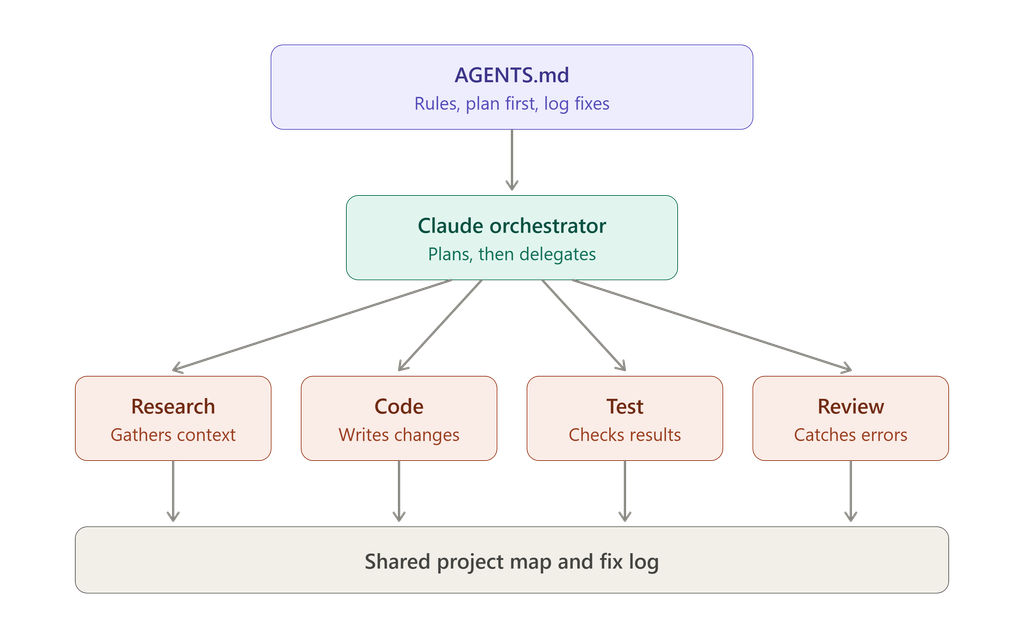
Alongside Anthropic’s official resources, the community has been developing its own setups. One of the most popular is the AGENTS.md file, a plain-text instruction file that lives in your project folder and tells an AI agent how to behave before it does any work. Claude Code’s own equivalent is a CLAUDE.md file, and the idea carries across tools.
These files typically lay out rules such as:
- Plan before coding. The agent outlines its approach before touching any files.
- Split tasks across subagents. Separate agents handle research, writing code, testing, and review.
- Document fixes. When a bug is solved, the solution is recorded so the same mistake isn’t repeated.
Why Structure Matters: From 20–30% to 80–90% Effectiveness
AI trainer JJ Englert has said that organized setups can raise effectiveness from roughly 20–30% to 80–90%. That figure is his estimate from training experience, not a controlled benchmark, but it matches what many users report.
The logic is simple. A model with no background on your project has to infer your preferences, coding style, and goals from scratch every session. A structured setup hands it that information up front, so it wastes far less time guessing.
How a Folder-Based Agent System Works
A typical setup has two layers:
- Global instructions. Rules that apply everywhere, such as your preferred tone, coding standards, and workflow habits.
- Project maps. A guide to a specific project explaining how the files are organized, what each part does, and where the agent should look first.
Because these systems are just folders and text files, they are portable. They work across platforms, so you aren’t locked into a single tool, and they are easy to version, share with teammates, and improve over time.
The Role of Subagents
Instead of one AI trying to do everything, a coordinated setup assigns roles. One subagent might research a problem, another might write the code, and a third might review it for errors. This mirrors how human teams work, and it keeps each agent focused on a narrower task, which tends to improve accuracy.
Beyond Coding: Research, Writing, and Operations
Although the conversation started with developers, the same approach applies elsewhere:
- Marketers can build agent workflows for content research and drafting.
- Analysts can set up agents to gather and summarize data. (Internal link opportunity: your article on AI for data analysis or research — replace with the exact page URL.)
- Small businesses can document recurring processes and let agents follow them consistently.
The Bigger Shift: From Prompts to Reliable Workflows
Prompt wording matters less than it used to. What matters now is the system around the AI: clear rules, shared context, defined roles, and a record of what has been learned. That is how AI moves from an impressive demo to a dependable tool. (Internal link opportunity: your related AI or productivity post — replace with the exact page URL.)
How to Get Started
- Explore Anthropic’s developer hub and try the guides and examples.
- Create a simple AGENTS.md (or CLAUDE.md) file with three or four rules for your project.
- Add a short project map describing your folder structure.
- Ask the agent to plan first, then build.
- Keep a running log of fixes so the system improves with use.
Frequently Asked Questions
What is Claude Code?
Claude Code is Anthropic’s agentic coding tool that lets developers delegate coding tasks to Claude from the command line, desktop, or mobile app.
What is an AGENTS.md file?
It is a text file of instructions that tells an AI agent how to work on your project, including rules, workflows, and context.
Do I need to be a developer to use AI agent teams?
No. The same structured approach works for research, writing, and business workflows.
Are these results guaranteed?
No. Figures like 80–90% effectiveness are practitioner estimates, and results vary by task and setup.
Conclusion
Claude’s evolution toward coordinated agent teams reflects a broader change in how people work with AI. With Anthropic’s developer hub and community-built setups like AGENTS.md, the focus has moved from writing clever prompts to building reliable systems. For U.S. developers and teams, that is a practical path to consistent, high-quality results. For more insights like this, visit Finova Insights.