Cybersecurity Awareness Month 2026: learn 10 practical online security tips, from MFA and password managers to phishing prevention and AI scam awareness.
Cybersecurity Awareness Month 2026: 10 Simple Ways to Stay Safe Online
Phishing emails, identity theft, ransomware, and social engineering are not new. What has changed is how polished they look. Attackers can now use artificial intelligence to write cleaner messages, personalize them faster, and run them at scale.
That is why Cybersecurity Awareness Month 2026 matters. Every October, governments, schools, and companies remind people that a few practical habits can prevent many common attacks.
The 2026 campaigns are global, with activity in the United States, India, Nigeria, and other countries. This guide covers what the month is, how AI is changing the threat landscape, and ten steps you can take today. It also has a business section, a checklist, and an FAQ.
What Is Cybersecurity Awareness Month?
Quick answer: Cybersecurity Awareness Month is an annual October campaign that teaches people and organizations how to stay safe online. It began in the U.S. in 2004 and now draws participants worldwide. Its core message is that everyday habits, like using multifactor authentication and spotting phishing, are a major part of security.
CISA and the National Cybersecurity Alliance lead the U.S. effort. Employers join in because employee mistakes and stolen credentials are common ways into a network. Schools join because students are online earlier than ever.
Cybersecurity awareness is no longer only an IT concern. Banking, healthcare, shopping, and work all happen through accounts and devices, so basic cyber hygiene now protects your money, your identity, and your employer.
Global Cybersecurity Awareness Campaigns in 2026
Countries run their own programs, and they are not identical. Even so, the messages overlap.
- United States: CISA’s 2026 theme is “Securing the Next 250,” tied to the nation’s 250th anniversary. Public information on the theme emphasizes protecting the systems Americans depend on.
- India: Coverage of this year’s observance describes a bell-ringing ceremony at the Bombay Stock Exchange led by Minister Ashish Shelar. The ceremony links cyber awareness to financial markets and the wider economy.
- Nigeria: Campaigns there have put cyber hygiene in the spotlight, encouraging everyday users to adopt safer online habits.
The shared message is that cybersecurity is not only a technology problem. Firewalls and detection tools matter, but so do the choices people make about passwords, links, and sensitive information.
Why Cybersecurity Matters More in the Age of AI
Quick answer: AI is changing cybersecurity by making scams cheaper, faster, and more convincing. Attackers can generate polished phishing messages, clone voices, and produce deepfakes. Defenders use AI too, for threat detection, fraud prevention, and monitoring. The result is a faster contest on both sides, which makes basic safeguards more important.
Security agencies and researchers have warned that attackers are using AI in several ways:
- More convincing phishing. Spelling errors and awkward phrasing, once reliable warning signs, are less common.
- AI-assisted social engineering. Tools can tailor a message to a person’s job, interests, or recent activity.
- Automation. Scripts can probe many accounts or systems with little human effort.
- Deepfake scams. Cloned voices and manipulated video can impersonate a boss or a relative.
- Faster malicious content. Fake websites and scam scripts take less time to build.
The result is that it is harder to tell a real message from a fraudulent one by appearance alone.
AI also helps defenders. Banks use it to flag unusual transactions, and security teams use it to sort alerts and spot abnormal behavior. Neither side has a lasting advantage, and good habits still work. For more background, see FinovaInsights’ coverage of AI and cybersecurity and the rise of AI agents.
10 Cybersecurity Tips Everyone Should Follow in 2026
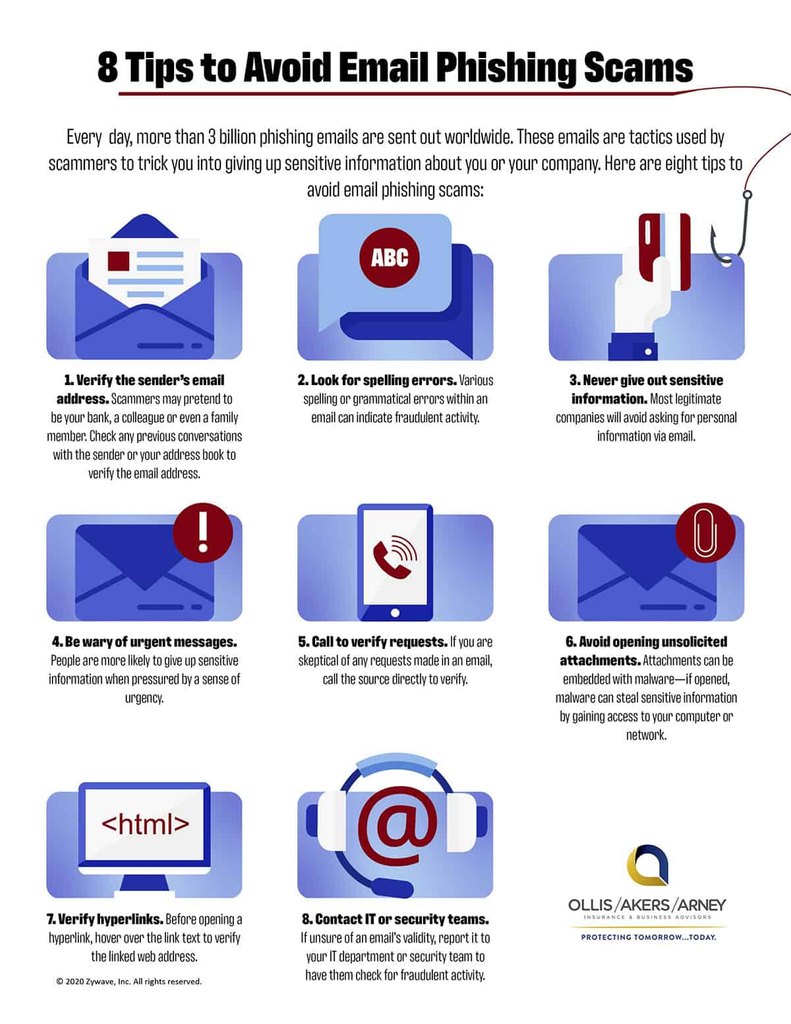
Quick answer: The most important cybersecurity tips for 2026 are to use unique strong passwords, turn on multifactor authentication, keep software updated, learn to spot phishing, verify unusual requests, protect personal information, secure your devices and Wi-Fi, back up your data, and treat urgent or money-related requests with caution.
These are recommendations from security agencies and experts, not guarantees. They reduce risk but cannot remove it.
1. Use Strong and Unique Passwords
When a service is breached, criminals try the stolen password on other sites. Reusing passwords lets one breach spread to your email, bank, and shopping accounts.
- Choose long passwords or passphrases, such as several unrelated words.
- Use a different password for every important account.
- Store them in a password manager so you don’t have to remember them.
NIST’s digital identity guidelines favor length over complicated character rules, and CISA’s strong-password guidance recommends password managers.
2. Turn On Multifactor Authentication
Multifactor authentication (MFA) asks for a second proof of identity beyond your password. Even if a criminal gets your password, they still can’t log in.
Common options include:
- Authentication apps
- Physical security keys
- Biometrics, such as a fingerprint or face scan
- One-time codes
Quick answer: MFA security matters because passwords are often stolen, guessed, or reused. A second factor adds a barrier that a stolen password alone cannot get past. Authentication apps and security keys are generally stronger than text-message codes. Start with email, banking, and cloud accounts. See CISA’s MFA guide.
3. Keep Software Updated
Software updates fix security flaws that attackers actively exploit. This applies to your operating system, browser, apps, and the firmware on devices like routers.
Turn on automatic updates where you can, and restart when prompted. Delaying updates leaves known holes open longer than necessary. See CISA’s guidance on updates.
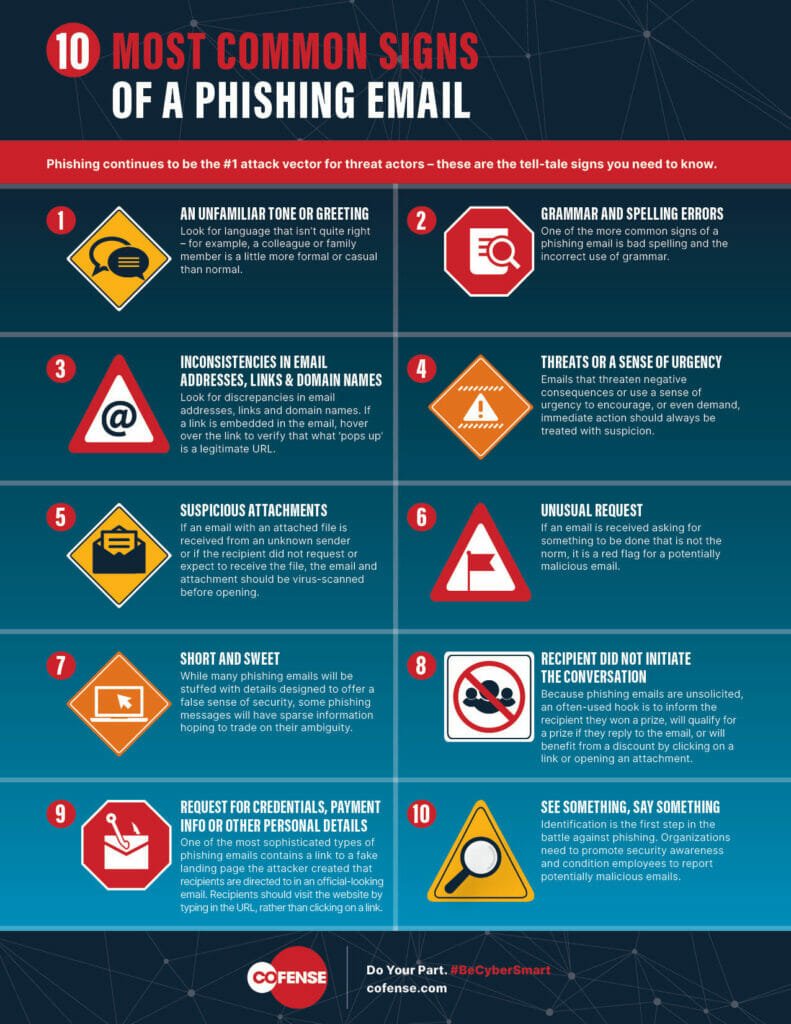
4. Learn to Recognize Phishing
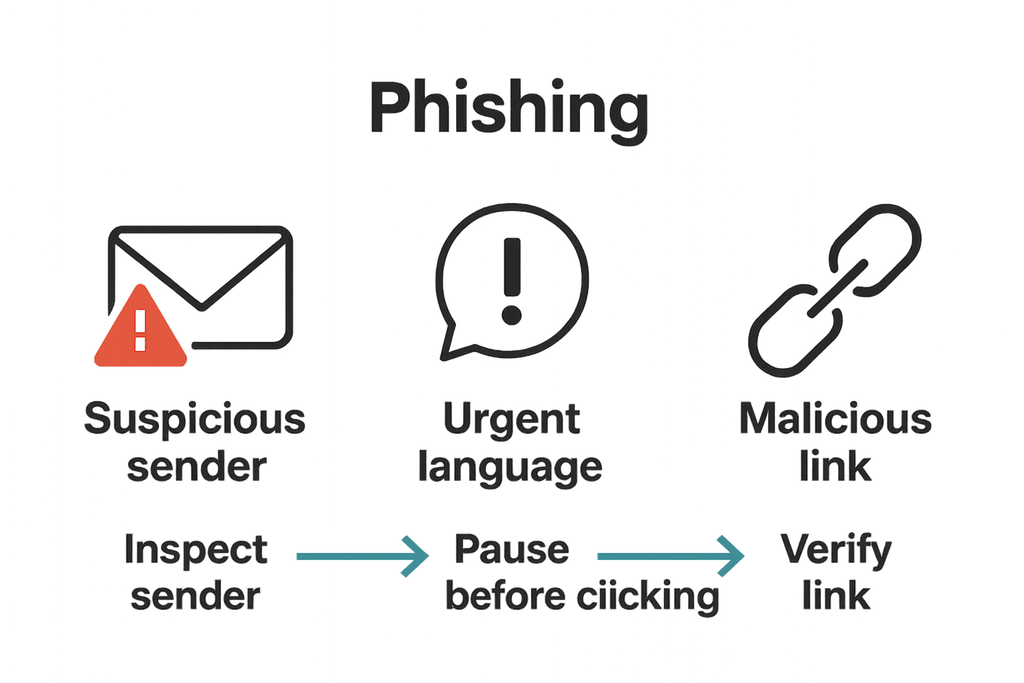
Phishing attacks try to trick you into giving up credentials, money, or access. Warning signs include:
- Unexpected urgency or threats
- Suspicious links or mismatched web addresses
- Fake login pages
- Requests for financial or personal information
- Unexpected attachments
- Messages claiming to come from a bank, employer, or government agency
Quick answer: To protect yourself from phishing, slow down, don’t click links or open attachments you didn’t expect, and check the sender through a separate channel. Type the company’s address yourself or use its official app. Report suspicious messages. CISA explains how to recognize and report phishing.
5. Pause Before Clicking
Use this rule: Stop. Check. Then Click.
- Stop and notice any pressure to act fast.
- Check the sender’s address, the link’s real domain (hover over it on a computer), and whether the message makes sense.
- Click only when it holds up. If you’re unsure, go to the website directly.
Scammers count on speed. Taking ten seconds is one of the most effective phishing prevention habits. FinovaInsights has more on common online scams.
6. Protect Your Personal Information
Oversharing gives criminals material for identity theft and convincing scams. Be careful with:
- Social Security numbers
- Banking and card details
- Passwords and recovery codes
- Passports, driver’s licenses, and other ID documents
- Your real-time location
- Sensitive work information
Share only what is necessary, and tighten privacy settings on social media. The FTC’s IdentityTheft.gov explains identity theft protection steps, including credit freezes and fraud alerts.
7. Secure Your Devices
Your phone and laptop hold much of your life. Basic protections include:
- A screen lock with a PIN, password, or biometric
- Device encryption, which is built into most modern phones and computers
- Reputable security software
- Automatic updates
- Apps installed only from official stores
- Regular backups
8. Secure Your Home Wi-Fi
Your router is the front door to your home network.
- Change the default router login.
- Use modern Wi-Fi security, such as WPA3 or WPA2 if WPA3 isn’t available.
- Set a strong, unique Wi-Fi password.
- Update the router’s firmware.
- Put guests and smart-home gadgets on a guest network where possible.
9. Back Up Important Data
Backups protect against ransomware, hardware failure, accidental deletion, and account compromise. Without one, any of these can mean permanent loss.
Keep at least one copy that isn’t always connected to your main device, such as an external drive you unplug or a separate cloud service. Ransomware can encrypt backups that stay connected. Test a restore occasionally.
10. Stay Alert to AI-Powered Scams
Scammers may use AI to create:
- Convincing emails and texts
- Fake customer-service chats
- Voice impersonation
- Deepfake videos
- Highly personalized messages
Your rule: If a request involves money, credentials, sensitive information, or urgent action, verify it through a separate trusted channel. Call the person on a number you already have. A family “code word” can help with voice-cloning calls. The FBI’s Internet Crime Complaint Center publishes warnings about current fraud trends.
Cybersecurity for Businesses
Cybersecurity for businesses works best when it covers people, processes, and technology. Employees are an important part of an organization’s defense, but they should never be blamed for breaches. Good systems make safe behavior easy and mistakes survivable.
Key practices include:
- Employee security training that is short, regular, and practical
- MFA on every account that supports it
- Password managers for staff
- Access controls and least-privilege access, so people only reach what they need
- Software patching on a defined schedule
- Security monitoring for unusual activity
- Data backups, tested and stored separately
- Incident-response planning, so people know whom to call and what to do
- Phishing simulations used for learning rather than punishment
The NIST Cybersecurity Framework gives organizations of any size a useful structure, and CISA offers free resources for small businesses. For wider context, read FinovaInsights on current cybersecurity threats and AI and technology trends.
Cyber Hygiene Checklist for 2026
☐ Use unique passwords
☐ Enable MFA
☐ Install software updates
☐ Use a password manager
☐ Check links before clicking
☐ Watch for phishing
☐ Back up important files
☐ Secure home Wi-Fi
☐ Protect sensitive information
☐ Verify unusual financial or account requests
What to Do If You Think You’ve Been Hacked
Stay calm and work through these steps:
- Disconnect the affected device from the internet if appropriate.
- Change compromised passwords from a different, trusted device.
- Enable MFA on affected accounts.
- Contact your bank or service provider if financial information may be exposed.
- Review account activity for anything you don’t recognize.
- Report phishing or fraud at ReportFraud.ftc.gov or the FBI’s IC3. Report identity theft at IdentityTheft.gov.
- Preserve evidence, such as emails, screenshots, and transaction records, in case of an investigation.
CISA also publishes guidance on reporting incidents.
Cybersecurity Awareness Is a Daily Habit
Cybersecurity Awareness Month raises awareness, but attackers don’t take November off. MFA, unique passwords, software updates, phishing awareness, backups, and verifying suspicious requests meaningfully improve your security posture when practiced all year. Think of them like locking your front door: small, routine, and effective.
Conclusion
Cybersecurity does not always demand advanced technical knowledge. Many effective defenses begin with simple daily decisions: using MFA, keeping software updated, protecting passwords, recognizing phishing, and pausing before you click.
You don’t need to change everything at once. This Cybersecurity Awareness Month 2026, pick two or three steps from the checklist and do them today. Then add more over time.
Frequently Asked Questions
1. What is Cybersecurity Awareness Month 2026?
It is the October 2026 edition of the annual campaign promoting safe online habits. In the U.S., CISA and the National Cybersecurity Alliance lead it, with the theme “Securing the Next 250.” Other countries run their own activities.
2. What are the most important cybersecurity tips in 2026?
Use unique strong passwords with a password manager, enable MFA, install updates, spot phishing, back up data, secure your devices and Wi-Fi, and verify any unusual request for money or credentials.
3. Why is multifactor authentication important?
MFA adds a second check beyond your password. If a password is stolen or reused, the attacker still needs the second factor, which blocks many account takeovers.
4. How can I identify a phishing scam?
Look for urgency, mismatched links, unexpected attachments, requests for sensitive information, and impersonation of trusted organizations. When unsure, contact the organization through its official website or app.
5. How is AI being used in cyberattacks?
Attackers may use AI to write convincing phishing messages, personalize scams, clone voices, create deepfakes, and automate parts of attacks. Defenders also use AI to detect fraud and threats.
6. How can businesses improve cybersecurity awareness?
Provide regular, practical training; require MFA; limit access by role; patch systems; run phishing simulations; maintain tested backups; and prepare an incident-response plan. Foster a culture where employees can report mistakes without fear.
7. What is cyber hygiene?
Cyber hygiene means the routine habits that keep your accounts, devices, and data secure, such as updating software, using strong passwords, enabling MFA, and backing up files.
Notes Before Publishing
- Internal links: Replace the five REPLACE-WITH-URL placeholders (AI cybersecurity, AI agents, online scams, cybersecurity threats, AI and technology) with real FinovaInsights article URLs.
- India and Nigeria: These are worded as reported from your source material. Please confirm the details and add a citation link.
- Length: About 2,100 words, within the 1,800–2,200 target.
- Verification: The “Securing the Next 250” theme matches the sources found. Confirm the CISA page wording before publishing.
Source :
- CSULB: Cybersecurity Awareness Month 2026 states the 2026 U.S. theme, “Securing the Next 250,” and that CISA and the National Cybersecurity Alliance lead the month.
- UMGC: Cyber Awareness Month 2026 describes the National Cybersecurity Alliance kickoff and the CISA/NCA partnership.
- Piracy Monitor: 2026 toolkit confirms that CISA and the National Cybersecurity Alliance lead the campaign and that a 2026 toolkit exists.
- CoinGate: Dates, Themes and Tips gives the October 1–31 dates, the “23rd edition” and the theme’s link to the U.S. 250th anniversary. It is a secondary source, so I’d rely on CISA for anything you quote.
- Petronella Tech is the source for the October 2004 launch date. This is also a secondary source.